Superpowers
Components
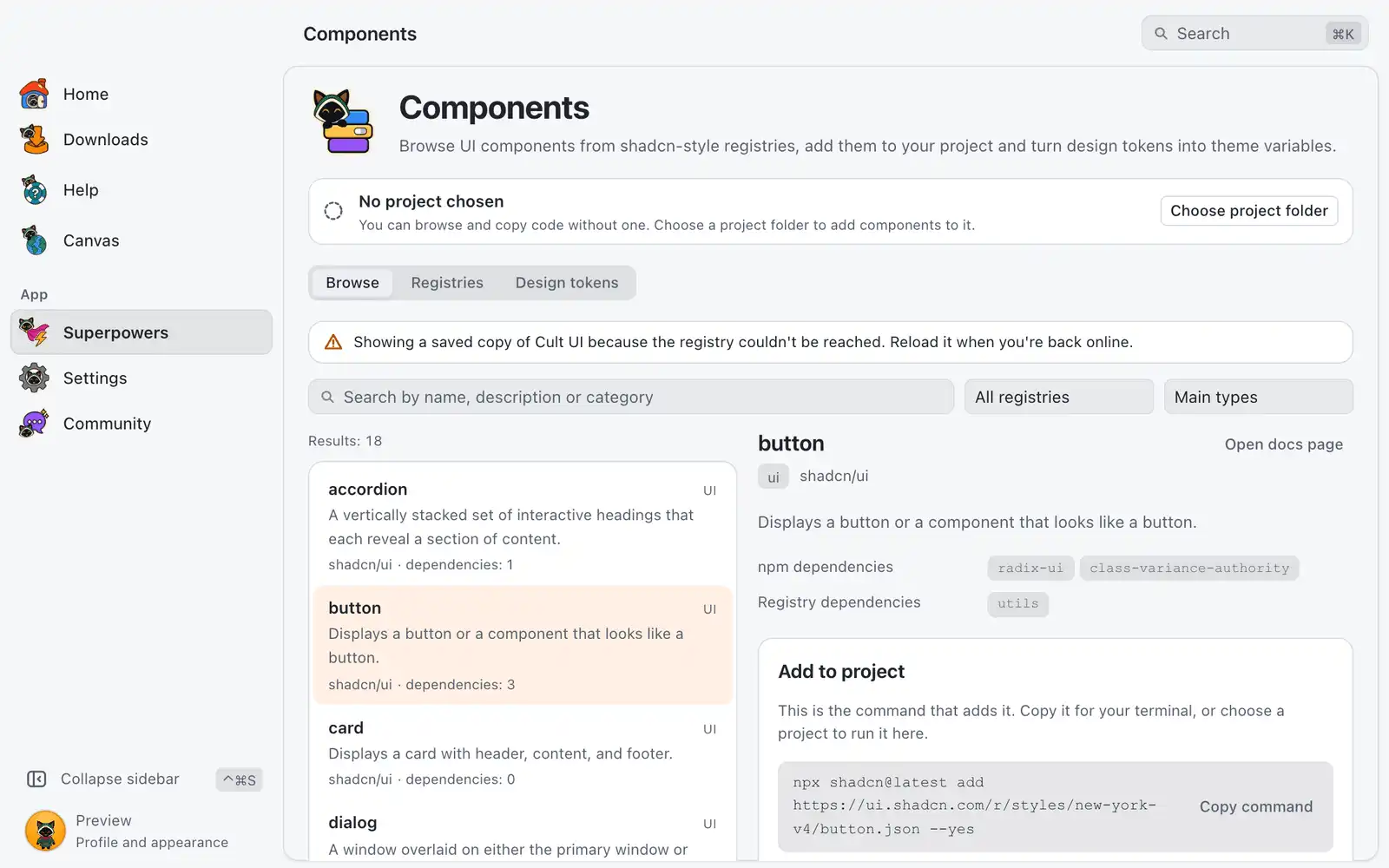
Components lists UI components from public registries in the shadcn format and shows the files, dependencies and command of each one. It can run that command in your project, and it turns a design tokens file into shadcn theme variables.
Where it is
Superpowers › Components › Open, in the Design category. The card is always shown: there is no switch for it in Settings › Integrations. The page has three tabs: Browse, Registries and Design tokens.
Adding a component runs npx, pnpm, yarn or bunx, so the project needs Node.js or the package manager it uses.
How to use it
- In Browse, search by name, description or category, and filter by Registry and Type.
- Click a component to see its Files, dependencies and the command that adds it. Copy file and Copy command work without a project.
- To add it from here, click Choose project folder and pick the root folder of a JavaScript project.
- If the project has no
components.json, click Set up shadcn here once. It uses the default style, which you can change later in that file. - Click Add to project. The Command output shows what the command prints, and Stop ends it.
Browse
Each component shows its npm dependencies, Dev dependencies and Registry dependencies, and Open docs page when the registry has one. Long files show their first lines, with a button to show all.
The project line above the list tells you what OmniGet found in the folder: a shadcn project, a project without components.json, or a folder without package.json. It also names the package manager, read from the lockfile. A project on Yarn 1 runs the command with npx, because that version has no dlx command.
Replace files that already exist is off by default: files that are already in the project are left as they were, and the result says how many were written and how many were skipped. If you stop a command, files written before that stay in the project.
Registries
OmniGet comes with 4 registries: shadcn/ui, Magic UI, React Bits and Cult UI. Each row shows how many items it has and when it was updated, with Reload next to it.
To add another, paste the address of the registry’s JSON index under Add a registry by address and click Add registry. The address must start with https://, be public, and point to a JSON file such as https://example.com/r/registry.json. Registries you added have Remove.
OmniGet only reads registries and keeps a copy for 24 hours, so the list also works offline. Nothing from a registry runs on your computer until you press a button that runs the shadcn command.
Design tokens
This tab turns a design tokens JSON file (DTCG), like the ones exported by Tokens Studio, Penpot or Palette, into shadcn theme variables.
- Click Choose tokens file, or paste the JSON and click Read tokens.
- Check Variable mapping. OmniGet matches tokens to
--background,--primaryand the other shadcn variables by name. For each variable, pick the token for the light theme (:root) and the dark theme (.dark), or Don’t set. Show unmatched variables lists the ones with no match. - Click Copy CSS under Generated CSS, or go on to write it into the project.
- Under Write into the project’s global CSS, check the path of the CSS file and click Review changes. The lines that will be added and removed are shown.
- Confirm the write, or click Don’t write.
After writing, reload your dev server page to see the new theme.
Common problems
“No registry could be loaded”
OmniGet could not reach any registry and has no saved copy yet. Check your internet connection or proxy, then click Reload registries. A registry that takes more than 15 seconds to answer, or a file larger than 5 MB, is refused.
The add button is off
The message next to it says why: no project chosen, no package.json in the folder, a components.json that is not valid JSON, or a project that is not set up for shadcn yet. If the registry gives no address for the item, copy the files instead.
“The package manager isn’t installed or isn’t on the PATH”
Install Node.js, or the package manager this project uses, and try again. You can also copy the command and run it in a terminal.
The shadcn command stopped with an exit code
The last lines of Command output say why. Fix that and click Try again, or run the command in a terminal.
“The file changed after you reviewed it”
Nothing was written. Click Review changes again. OmniGet does not edit a CSS file larger than 2 MB; copy the CSS and paste it by hand.
Some colors were left out of the CSS file
The file stores colors as HSL channels and those token values cannot be converted. Pick a hex, rgb(), hsl() or oklch() token for them.