Superpowers
Scrape
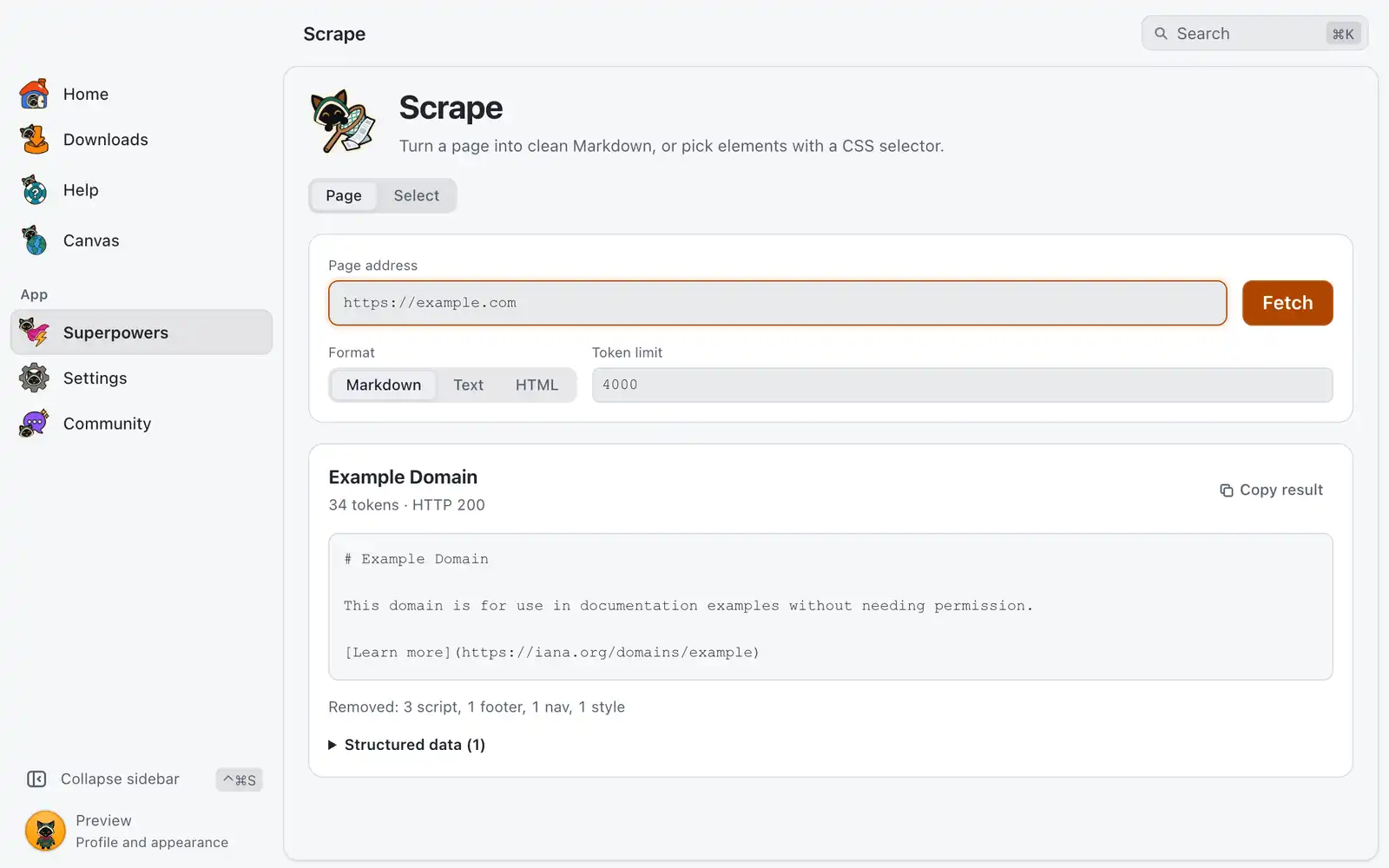
Scrape fetches a public page and gives you its main content, with the navigation, scripts, footers and ads removed. It can also pick out just the elements you name with a CSS selector. It needs no account and no key.
Where it is
Superpowers › Scrape › Open, in the Developer category. The card is always shown: there is no switch for it in Settings › Integrations. The page has two modes, Page and Select.
Scrape reads pages over plain HTTP, the way a script would. Pages that need a login or that are built by JavaScript belong in the Global Downloader browser.
How to use it
Read a page
- Open Page and paste the address in Page address.
- Pick the Format and, if you want, change the Token limit.
- Click Fetch or press ↩Enter.
- Click Copy result.
Above the content you see the page title, the token count and the HTTP status. Below it, Removed counts what was taken out, by kind. If the page carries JSON-LD or embedded app state, Structured data shows up to 5 of those blocks.
Pick elements
- Open Select and paste the address.
- Type a CSS selector, such as
h1, .price, a[href]. - To get an attribute instead of the text, type its name in Attribute (optional), for example
href. - Click Find.
The result lists the matches, up to 20, and says how many there are in total. When nothing matches, the page shows similar selectors that do exist in the page; click one to try it.
Options
| Option | What it does | Default |
|---|---|---|
| Format | Markdown, Text (no markup) or HTML (the markup of the main content only). | Markdown |
| Token limit | Cuts the content at this many tokens. A notice says how much was cut. | 4,000 |
| CSS selector | Which elements to list, in Select. | |
| Attribute (optional) | Returns this attribute of each match instead of its text. | Empty |
A page can be up to 5 MB, and a request waits up to 20 seconds.
For AI agents
dev_scrape of the MCP server has the same two operations.
op=fetchreturns the main content asmarkdown,textorhtml, plus the structured data.maxTokenssets the budget,rawkeeps the whole page, andurlsreads up to 10 pages in one call. Each result carries a hash; passing it back asifHashanswersunchangedwith no content when the page is the same.op=selectreturns the matches of aselector, from aurlor fromhtmlthe agent passes. Withremember, the shape of the element is saved per site: if the selector later matches nothing, the closest element comes back with a selector that works now.
Everything the tool returns is content from the web, so agents are told to treat it as untrusted. The tool needs the devtools_read permission. From a terminal, omniget-cli tool dev_scrape op=fetch url=https://example.com calls it while the app is running. See Command line.
Common problems
The site blocked the request
Some sites answer scripts with a challenge page, a captcha or a rate limit. Scrape stops there and tells you. Click Open in the Global Downloader browser to read the page in a real browser session.
“No text came back.”
The page is probably built by JavaScript, so the HTML that arrives is empty. Use Open in the Global Downloader browser.
The content is cut
The Token limit was reached. Raise it to get the rest.
No match for the selector
Click one of the selectors listed under These exist in the page:, or read the page in Page mode with the HTML format to see its real structure.
The server answered with an error status
Check the address. API shows the full response, with headers and redirects.