Superpowers
Motion
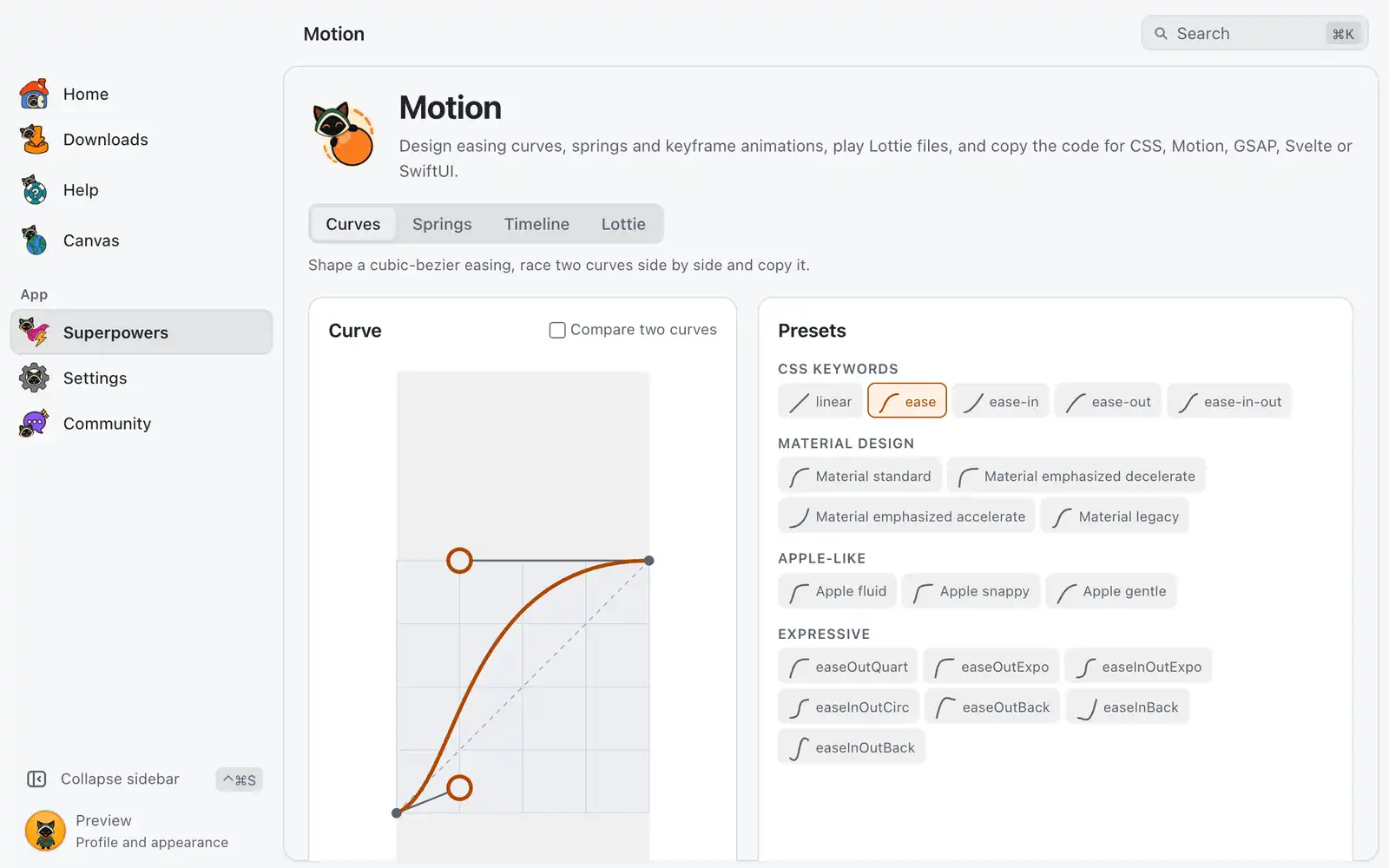
Motion is where you tune how things move before you write the animation. You shape a curve or a spring, watch it run, and copy the code for the tool you use.
Where it is
Superpowers › Motion › Open, in the Design category. The card is always shown: there is no switch for it in Settings › Integrations. The page has four tabs: Curves, Springs, Timeline and Lottie.
How to use it
- Pick the tab for what you need: a cubic-bezier easing, a spring, a keyframe animation or a Lottie file.
- Change the values and watch the Preview. Play, Pause and Replay control it.
- Under Export, click Copy on the block for your tool.
If your system has Reduce motion turned on, previews wait for you: press Play to run one pass.
Curves
Drag the two handles of the curve, or type the Control point values. Presets are grouped as CSS keywords, Material Design, Apple-like and Expressive. A curve that leaves the box goes past the target before it settles.
Compare two curves runs Curve A and Curve B side by side from the same start, so you can see which one is ahead at each moment. Swap A and B exchanges them. Animated property changes what the preview animates, and Duration how long it takes.
The export blocks are CSS, Motion, GSAP and Svelte. The GSAP code needs the CustomEase plugin. Use on selected keyframe sends the curve to the keyframe selected in Timeline.
Springs
Set Stiffness, Damping, Mass and Start velocity, or start from a preset: Default, Gentle, Wobbly, Stiff, Snappy or Slow. The plot shows the position over time, and the page reports Settles in, the Damping ratio (bouncy, critical or no bounce) and the Overshoot.
The export blocks are CSS linear(), Motion, Svelte and SwiftUI. For CSS, linear() tolerance trades accuracy for length: a lower value is more exact and gives more points. The Svelte and SwiftUI blocks show how the values were converted. If the spring is too stiff or too damped for Svelte, the page says the values were capped and the result will feel different.
Timeline
Animates one element on a Stage: a Box, a Text or an Image you choose.
- Move the Playhead and click a track to add a keyframe there. The tracks are Move X, Move Y, Scale, Rotate, Opacity and Color. Load example fills in a sample.
- Select a keyframe to edit its Time (ms), its value and the Easing to next keyframe. Each segment has its own easing.
- Set the Duration, between 100 and 60,000 ms, and use Loop and Speed while you watch.
- Copy the
CSS @keyframesblock or the Web Animations API block. The second one runs withelement.animate()and needs no library. Class name sets the name used in the CSS.
Under File, Save as… writes the timeline to a .json file and Open… reads one back. Keep in Recent stores up to 8 timelines in the app data folder. An image on stage is not stored in the file, and the Color track does not apply to images.
Lottie
Click Open animation or drop a .json (Lottie) or .lottie (dotLottie) file. It plays without running any code from the file.
- Frame scrubs through the animation; Previous frame and Next frame step one at a time.
- Background can be Transparent, Light, Dark or Custom.
- Details lists the size, frame rate, frames, layers, assets, format and file size.
- Save frame exports the current frame as a PNG at the Size you pick. Turn on Include background to keep the background; with Transparent the PNG stays see-through.
When a .lottie holds several animations, the first one is shown.
Shortcuts
| Keys | What they do |
|---|---|
| Arrow keys | Move a focused curve handle. ⇧Shift takes bigger steps and ⌥Alt finer ones |
| ← / → | Move a focused keyframe in Timeline |
| ⌦Delete | Remove a focused keyframe |
Common problems
“Never settles”
With no damping the spring keeps bouncing. Add some damping to get a settle time. Exports use the first 30 seconds.
“No keyframe is selected”
Use on selected keyframe needs a target. Select a keyframe in Timeline, then send the curve again. The last keyframe of a track has no easing, because nothing comes after it.
“The animation could not be drawn”
The Lottie file may use features the lightweight player does not support, such as expressions. Animations with 3D layers are drawn flat.
A file is not a Lottie animation
The file must be valid JSON with layers, a size and a frame rate. Export it again from your animation tool.
A timeline opened with the box instead of my image
Images are not stored in the timeline file. Pick Image and choose it again.