Superpowers
Type
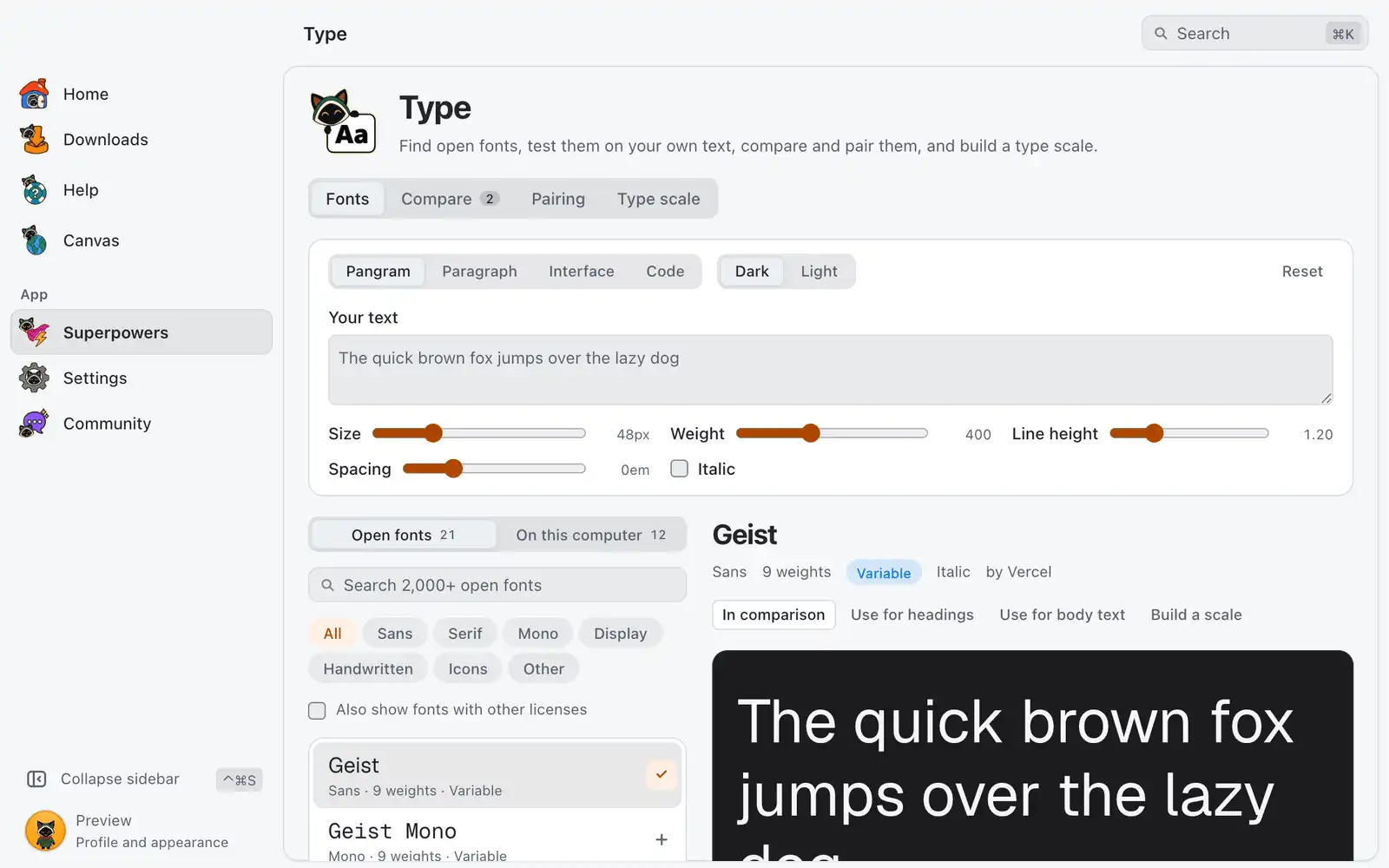
Type is a font browser. You preview open fonts on your own text, put them side by side, try a heading and body pair, build a type scale and install the font you chose.
Where it is
Superpowers › Type › Open, in the Design category. The card is always shown: there is no switch for it in Settings › Integrations. The page has four sections: Fonts, Compare, Pairing and Type scale.
The list of open fonts comes from the Fontsource catalog, and previews load from the Fontsource CDN, so both need the internet.
How to use it
- In Fonts, choose Open fonts or On this computer, then search or filter by style.
- Click a font to preview it. Change the sample text, size and weight until it looks like your real use.
- Click Add to compare, Use for headings, Use for body text or Build a scale to carry the font to another section.
- Under Get this font, click Install with the font’s name, or Download files… to save the files to a folder you pick.
Fonts
The style filter has All, Sans, Serif, Mono, Display, Handwritten, Icons and Other. Fonts under a license other than OFL, Apache or MIT are hidden until you turn on Also show fonts with other licenses. You can preview those, but OmniGet does not install or download them.
The preview has these controls:
| Option | What it does | Default |
|---|---|---|
| Sample text | Pangram, Paragraph, Interface or Code. Typing in Your text replaces the preset. | Pangram |
| Size, Weight, Line height, Spacing | Shape the sample. | |
| Italic | Shows the italic style when the font has one. | Off |
| Preview background | Dark or Light. | Dark |
Reset puts the sample back. For a font on your computer, Show in folder finds its file.
Install or download
Install saves the TrueType files to your fonts folder. A file that is already there is kept and not replaced. If the font is split by script, pick the one you write in under Script. When the files come from Google Fonts they are complete, with every script the font has; if Google Fonts does not answer, you get the files for the chosen script only, and the page says so.
If a font with the same name is already on the computer, the page warns you: a second copy can make apps pick the wrong one, so Download files… is the safer choice. Stop ends an install in progress, and the files saved before that stay. After an install, apps that are open may need a restart to list the font.
Compare
Shows up to 3 fonts on the same text. Add them with the + button in the list or with Add a font.
Pairing
Pick a Heading font and a Body font, set the Heading weight and Body size, and read the result on a sample article and an interface sample. Swap exchanges the two fonts.
Type scale
Builds a set of sizes from a base size and a ratio, previewed in the chosen Font.
| Option | What it does | Default |
|---|---|---|
| Base size | The size of body text, in px. | 16 |
| Ratio | How much each step grows, from Minor second to Golden ratio. | Major third |
| Steps below base | Smaller sizes, up to 4. | 2 |
| Steps above base | Larger sizes, up to 10. | 6 |
| Fluid sizes | Sizes grow with the window, written as CSS clamp(). Adds a base size and ratio for small and large screens, plus Small screen width and Large screen width. |
Off |
Under Export, choose CSS variables or Tailwind v4, then click Copy CSS or Copy @theme. With Fluid sizes on, the preview uses the real clamp() values, so resizing the window moves the sizes.
Common problems
Only a few fonts are listed
Fontsource is out of reach, so only the 12 hand-picked fonts are shown, and previews also need the internet. Check your connection, then click Try again in the list.
The preview shows a system font
The font could not be loaded from the Fontsource CDN. Check your connection.
The install button is off
Only fonts under OFL, Apache or MIT can be installed from here. If the file list did not load, click Try again above it. If there are no TrueType files for the chosen script, pick another one.
The font does not appear in another app
Restart that app. On some systems you need to sign out and back in.
Satoshi is not in the list
It is free to use but not open source, so it is not listed. The page suggests Geist, Inter and Manrope as close open alternatives.