Superpowers
Research
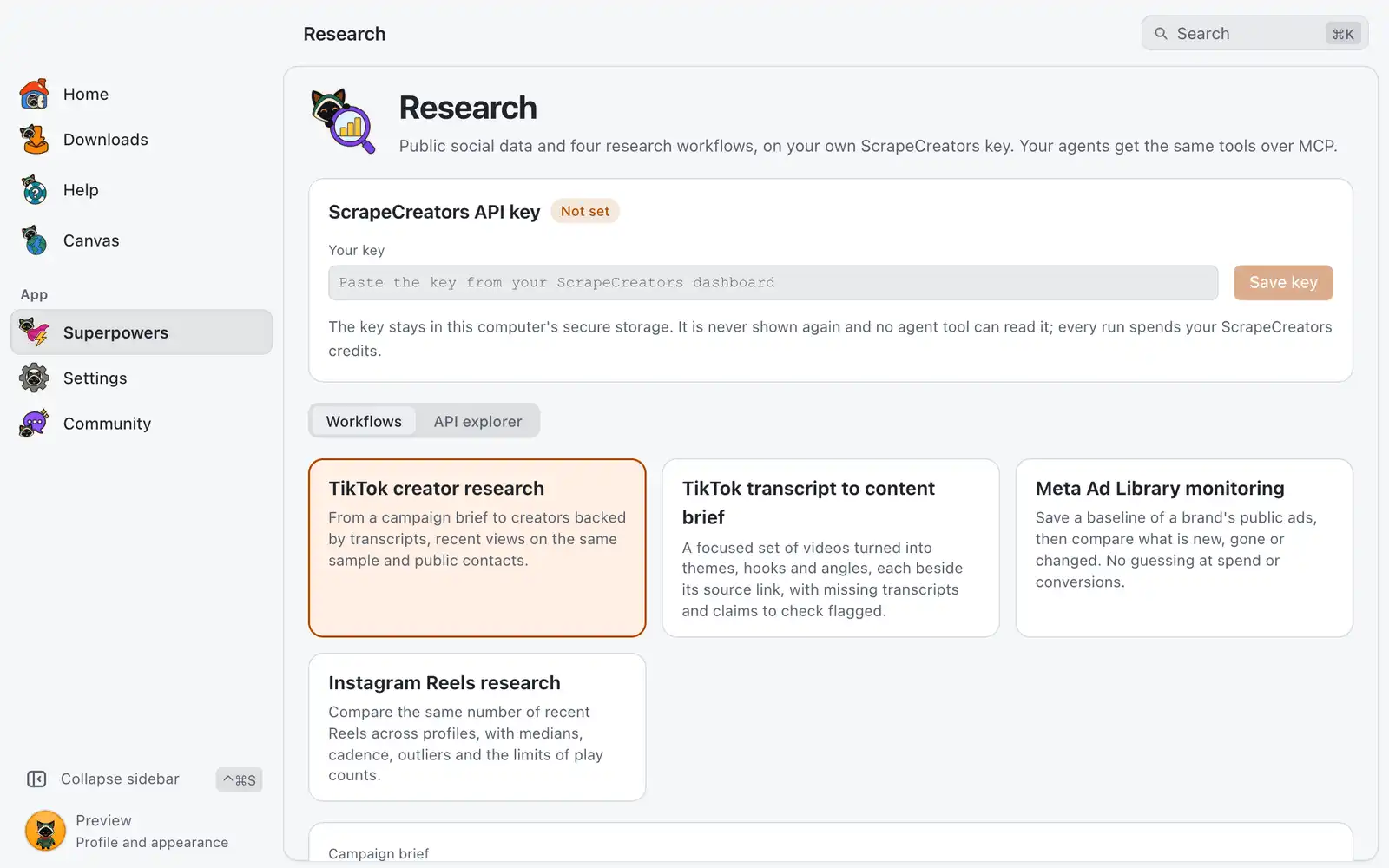
Research reads public social data through ScrapeCreators, a paid third-party API, using a key you bring yourself. It has four ready workflows that return evidence tables, and an explorer for every operation of the API.
Where it is
Superpowers › Research › Open. The card is always shown: there is no switch for it in Settings › Integrations.
The page has the ScrapeCreators API key panel on top and two tabs below it: Workflows and API explorer.
How to use it
- Create an account at ScrapeCreators and copy the key from your dashboard. OmniGet does not sell or include credits.
- In Your key, paste it and choose Save key. The panel changes from Not set to Saved.
- Choose Check balance to see how many credits are left. The panel also shows the credits used this session.
- Open Workflows, pick one, fill in the form and choose Run.
- Read the evidence tables. Click a column header to sort.
- Choose Copy brief for my agent to copy the result as Markdown, with How to write it, What this data cannot prove and the Evidence data, ready to paste into an AI tool.
The key stays in this computer’s secure storage. It is never shown again and no agent tool can read it. Replace key and Remove key are in the same panel.
Workflows
TikTok creator research
Goes from a campaign brief to creators backed by transcripts, recent views on the same sample and public contacts. Write the Campaign brief and the Search queries (one per line). If you leave the queries empty, OmniGet suggests some from your brief and fills them in for you to review; nothing is spent until you run again.
The result has Creators (followers, median and mean views, sample, confidence, public contact, missing data) and Matching videos and transcript evidence. Read the link-in-bio page for a public email looks only at what the creator published.
TikTok transcript to content brief
Turns a focused set of videos into themes, hooks and angles, each beside its source link, with missing transcripts and claims to check flagged. Give Video links (one per line), or a search query, a hashtag or a profile handle.
Meta Ad Library monitoring
Works in steps, chosen in Step:
- Find the page: search for the brand to get its Page ID.
- Save a baseline: store the brand’s public ads under a Baseline name.
- Compare with the baseline: fetch again and see New ads, No longer listed, Changed ads and Not seen in a partial fetch.
- Saved baselines: list what you stored.
The Ad Library shows no spend, no conversions and no targeting for commercial ads, so nothing here measures results. An ad that is no longer listed may have ended, been paused or been removed; the library does not say which.
Instagram Reels research
Compares the same number of recent Reels across the Profiles to compare (one per line), with medians, cadence, outliers and the limits of play counts.
Reading the results
- Confidence is Low under 10 items in the sample, Medium under 20 and High from there.
- Each result lists what the data cannot prove. Keep that part when you pass the result on.
- Results are public content from outside the app. Treat them as untrusted, and check a claim at its source link before you repeat it.
API explorer
API explorer calls any operation of the API by hand: 199 operations across 38 platform groups in this version.
- Pick a Platform and an Endpoint.
- Fill in the parameters. The ones marked Required must be filled.
- Choose Run endpoint. The result shows the credits used and left.
- Use Next page when the endpoint has more, and Copy JSON to copy the answer. A long answer is shown in part, with the full answer saved to a file whose path the screen gives.
Options
| Option | What it does | Default |
|---|---|---|
| Recent posts per profile | Creator research: how many recent posts are read for each creator. | 10 |
| Creators to analyse | Creator research: how many creators get the full analysis. | 5 |
| Transcripts per creator | Creator research: how many transcripts are fetched for each creator. | 2 |
| Pay for AI transcription when there are no captions | Uses the API’s paid transcription for videos without captions. | Off |
| Read the link-in-bio page for a public email | Opens the creator’s public link page to look for a contact. | On |
| Videos to take | Content brief: how many videos are used. | 5 |
| Transcript characters per video | Content brief: how much of each transcript is kept. | 1,500 |
| Ad status | Ad monitoring: which ads the baseline tracks. | ACTIVE |
| Ads to fetch at most | Ad monitoring: the cap of one fetch. | 100 |
| Replace the baseline with this fetch after comparing | Ad monitoring: makes the new fetch the next baseline. | Off |
| Recent posts per profile | Reels research: how many Reels are compared per profile. | 12 |
| Post detail | Reels research: fetches extra detail for each profile’s outliers, which costs more credits, or skips it. | outliers |
For AI agents
Agents connected through the MCP server get the research_* tools when the Research permission is on:
research_endpointslists the operations and their parameters, andresearch_callruns one. Wrong or missing parameters are refused before any credit is spent.research_usagereports the credits.research_tiktok_creators,research_tiktok_brief,research_meta_adsandresearch_reelsare the four workflows.
All of them only read public data. They use the key you saved, which the agent never sees, and each call spends your ScrapeCreators credits. These tools do not wait for approval in the OmniGet window, so turn the permission off under Permissions in Settings › AI & agents if an agent should not spend credits.
Common problems
“Save your API key above to run this.”
No key is saved. Paste it in Your key and choose Save key.
The key is refused or the balance does not load
Copy the key again from your ScrapeCreators dashboard and use Replace key. If the balance is at zero, add credits there; OmniGet cannot.
Creator research filled in queries and showed no result
That is the first step when Search queries (one per line) was empty: review the suggested queries and choose Run again.
A table says “Nothing to show here.”
The API returned nothing for that part, for example a video without captions while AI transcription is off. The Missing data column and the notes under the tables say what is missing.
A comparison lists ads as “Not seen in a partial fetch”
The fetch stopped at Ads to fetch at most before reaching every ad, so those ads are not counted as gone. Raise the cap and compare again.